
Self storage consists of rental units where individuals and businesses keep personal belongings, goods or equipment. Tenants bring and collect their items themselves and use the facility under agreed terms. [FEDESSA/CBRE, 2025, pp. 6–7]
This guide is aimed primarily at people planning their first container-based facility, with the option to expand in phases. It helps organise decisions, build a budget and prepare questions for suppliers and advisers. Regulatory guidance is limited to general EU-level context; planning, building approvals and taxes must be checked locally. It is not legal advice for a particular site.
1. Location analysis
You can plan a self-storage facility in a large city or a smaller town. Look for a location where residents and businesses need additional space and you can offer convenient storage close to home or work.
Finding opportunities in smaller towns
A small town does not rule out a successful self-storage business. If residents and businesses need storage but the nearest option is in another town, a local facility may fill that gap. Proximity is its advantage: customers can store their belongings nearby without longer journeys.
A lack of direct competition is a reason to look more closely at a location. Find out how residents currently manage a shortage of space and whether they would rent a unit. Ask what they need to store, for how long and what monthly cost they would find acceptable. This forms the basis for a local offer.
Understand the needs of residents and businesses
Check the population of the town and nearby communities, housing development and the presence of local businesses. Pay particular attention to:
- Residents — needs arising from moving home, renovations, seasonal belongings and a lack of space at home.
- Housing estates — the number of homes, availability of storage rooms and garages, and new residential developments.
- Businesses — online retailers, renovation teams and shops looking for space for stock, tools or equipment.
Eurostat provides regional statistics for comparing areas across the EU. Check the reference year and geographical level: regional figures are not a measurement of demand on a particular street. Supplement them with official local data, the municipality’s information and a site visit; distinguish completed development from plans. [Eurostat — regional statistics database]
Find your competitive advantage
If self-storage facilities already operate nearby, compare unit sizes, availability, prices after promotions end, access hours and ease of access. Include garages and small warehouses available to rent. You are looking for a specific need that the current offer does not meet.
Your advantage might be storage closer to a housing estate, convenient vehicle access to the container, a different unit size or more suitable access hours. You do not have to compete on the lowest price alone. What matters is giving customers a clear reason to choose your facility.
Convenient access and visibility
A good location does not have to be in the town centre. What matters is that local customers can easily find the facility and bring their belongings. Before choosing a plot, check:
- Travel times from nearby housing estates, businesses and neighbouring towns.
- Access for vans or vehicles with trailers, without awkward turning manoeuvres.
- Space to park and unload beside the units.
- Visibility from the road and the ability to install clear signage.
Match the facility’s size to the local market
A smaller market is worth considering alongside a smaller first phase. With a container-based model, you can plan an initial set of units and leave space for later expansion. Additional containers can then reflect the number of occupied units and customer enquiries, within the plot’s limits.
When comparing locations, consider customer needs, competition, access, land costs and the cost of opening the facility. Do not choose a town solely by its population. A small facility serving a specific local need is also worth considering.
Self Storage in a small town — how to assess local potential?
FEDESSA and Self Storage reports — how to use the data?
Who uses Self Storage, and how can you tailor your facility’s offer?
2. Site layout plan
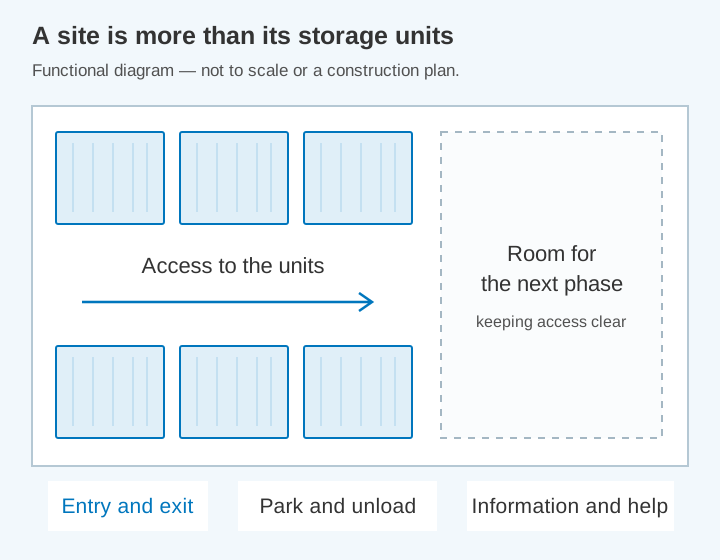
A site layout plan shows where containers will stand, where customers will drive and where you will leave room for expansion. Check the plot’s potential first, then refine its layout.
What to check with the local authority
Identify the competent local authority and the current planning documents for the plot. Ask whether the proposed storage use, access and layout can be considered there. Names, procedures and the legal effect of documents differ across EU countries. Have a qualified local adviser review the position before committing to a site.
Your Europe explains that permits and licences depend on the country and business activity. Its country information and points of single contact help locate the relevant requirements. They do not create one EU-wide planning approval or replace the authority responsible for a particular development. [Your Europe — registration, permits and licences in the EU]
If you are leasing the land, agree with the owner whether you can install containers, carry out the necessary work and use the access route. The contract should clearly state the lease term, rent increases, termination arrangements and what happens to improvements you make. It is worth reviewing these provisions with a lawyer before signing.
How to establish the formal requirements
Assess the complete operation, not just an isolated container. Construction, positioning, use and duration may all need to be considered under the applicable rules. The ability to move a unit does not, by itself, establish that a permanent rental business is exempt. [Your Europe — registration, permits and licences in the EU]
Prepare a technical description with the manufacturer and a site plan with a qualified designer. Establish locally which approvals and other steps are required for the full project, including works, connections and access. Keep written decisions and distinguish them from informal guidance. [Your Europe — registration, permits and licences in the EU]
Do not apply a “180-day rule” found online as a general EU permission for containers. A facility intended to operate for years needs a locally confirmed basis for that use. Any conditions or time limits must come from the applicable rules and the actual project documents, not a borrowed overseas procedure. [Your Europe — registration, permits and licences in the EU]
Leave room for convenient use of the site
- Access: check the entrance, van movements and space for unloading. Plan the delivery of the containers separately.
- Movement around the site: leave room to open doors, carry belongings, carry out maintenance and provide access for emergency services.
- Water and ground conditions: establish where rainwater drains and whether the ground can support the planned load.
- Utilities: check the availability of electricity, lighting and internet connections.
- Surroundings: account for neighbours, noise, light, fire-safety requirements and any other restrictions affecting the plot.
Use the official flood-risk and surface-water information available for the specific location. Inspect the plot after rain and discuss drainage with a qualified designer or contractor. A map is an initial source of information, not a guarantee that every local flooding risk has been identified.
Request a layout that will be convenient to use from the start while allowing additional containers to be installed later. The whole plot will not be rentable space — roads and other areas will occupy part of it.
How to choose land for container-based Self Storage?
Self Storage and building formalities — where to start?
3. Preparing and equipping the site
Compare the top 10 self-storage suppliers before requesting a quotation
With a site plan in place, you can collect quotations for containers and ground preparation. Agree on what the manufacturer will do and what falls to the site contractor. Ideally, keep one task list showing prices and the person responsible for each item.
How to prepare the ground
Not every container needs a concrete slab beneath its entire floor. For its own design, Procontainers describes the option of placing containers on level ground, including unpaved ground, using levelled supports. This solution applies to that manufacturer’s containers. [Procontainers — site preparation]
Other systems may have different requirements. CONTAINEX specifies a level, stable base and a support arrangement that depends on the type and layout of the containers. Ask the supplier of your chosen model for site-preparation instructions. [CONTAINEX — ground requirements]
Establish where the supports should go, what they should be made from and what load the ground must bear when the units are full. Confirm the choice of blocks or slabs with the manufacturer and the person assessing the ground. A self-supporting container still needs an appropriate base.
- Plan drainage from the roofs and the areas around the units.
- Prepare access routes and surfacing that remain usable in wet weather.
- Lay the required cables for the gate, cameras and lighting before finishing the site.
- Allow for fencing installation and the later addition of containers.
Container supports and customer surfacing are two separate decisions. Even if the structure does not require a full foundation slab, you still need convenient pedestrian and vehicle access to the units.
Choose container sizes and equipment
Return to the customer needs identified in step one. Someone storing a few pieces of furniture may need a different unit from a business holding stock. Compare available sizes, entrance width and the option to divide a container into smaller storage units.
Ask for internal dimensions and the door-opening dimensions — these determine what can be carried inside. For a used container, check its previous use, watertightness, floor, smell, corrosion and door operation. For a new container, also request documentation, warranty terms and servicing arrangements.
Ask about moisture and ventilation
Moisture can enter with a customer’s belongings. As temperatures change, water may form on a cold roof or walls. Hapag-Lloyd is among the organisations that describe this phenomenon. It notes that small pressure-equalisation openings do not provide effective ventilation. This is guidance on container transport, useful for understanding the issue rather than instructions for designing a storage facility. [Hapag-Lloyd — Container Packing, chapter 4]
Ask the manufacturer how the container is ventilated and what measures reduce condensation. Establish what can be stored inside. If the unit has neither heating nor humidity control, explain these conditions clearly to customers.
Compare quotations with the same scope
- Containers: quantity, sizes, doors, partitions, flooring, ventilation and locks.
- Delivery: transport, unloading, required equipment and on-site assembly.
- Site: who prepares the ground, supports, access routes and installations.
- Timings: delivery date, installation duration and payment terms.
- Service: warranty coverage, parts availability and a contact for faults.
At handover, inspect each type of unit: open the doors, test the lock and compare the workmanship with the order. Record any remedial work and deadlines in the handover report. Formal authorisation to use the whole facility, where required, is a separate process.
Containers, garages or indoor units — which Self Storage model should you choose?
New or used containers — which should you choose for Self Storage?
Self Storage container manufacturers — how to compare offers?
Moisture in a Self Storage container — how to reduce condensation?
Which unit sizes should you choose for your first Self Storage site?
4. Security
Well-chosen security measures should protect customers’ belongings and make day-to-day operation easier. Start with fencing, lighting, the gate, unit locks and CCTV. Before buying, check the insurer’s requirements too — these may specify, for example, the type of locks.
Site entry and unit locks
A code-operated gate and a unit lock are two separate elements. You could consider electronic site access with padlocks on the containers, or a system that also includes electronic unit locks. Match the choice to your operating model, costs and security requirements.
- Padlocks: establish the appropriate type, how the locking point will be protected and what to do if a key is lost.
- Electronic locks: check how access is granted and withdrawn, the power supply, operation without internet and emergency opening.
- Gate: agree with the contractor on safe entry and exit, including how people can leave the site during a fault.
- Users: establish how customers receive access and when it is withdrawn after their contract ends.
CCTV and help when problems arise
Cameras help establish what happened on the site. Also decide who receives reports of a faulty gate, damaged lock or another problem. Customers should have a contact number and short instructions readily available.
Clearly distinguish between 24-hour access, video recording and the presence of security staff in your offer. They are different services. If security staff do not monitor footage live, describe CCTV according to how it actually operates.
Discuss power or internet outages, gate faults and safe exit procedures with the contractors. Agree with a fire-safety specialist on the requirements for the project, emergency-service access and restrictions on stored items. A short list of contacts and actions makes responding easier.
Protecting customers’ privacy
For CCTV, you need to define why you record, the legal basis, who has access to the images and how long recordings are kept. European Data Protection Board guidelines call for clear information before people enter the monitored area and access to the full policy. Retention periods should reflect a justified need, not the recorder’s factory settings. [EDPB, Guidelines 3/2019, chapters 7–8]
Position cameras to cover the necessary areas without unnecessarily recording neighbours. Give access to recordings to specific people. A data-protection specialist can help prepare customer information and assess whether an additional risk assessment is needed.
5. Software
Compare the top 10 systems for managing a self-storage facility
Good software can organise bookings, contracts, payments and unit access. First consider how much customers should be able to do independently online and where you will help them.
See the rental process from the customer’s perspective
Ask the supplier to demonstrate the whole journey: the customer chooses a unit, enters their details, signs a contract, pays and receives access instructions. Test it on a phone too. This demonstration makes the software easier to assess than a feature list alone.
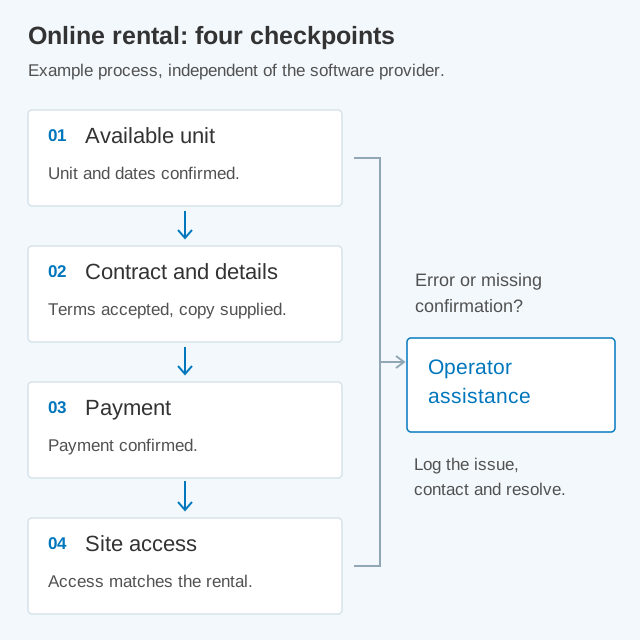
It is important that the booking, payment confirmation and gate access work together. For example, Stora’s documentation describes unit allocation and access permissions separately. When speaking to a supplier, ask how its software connects these actions. This is an example of a solution, not a recommendation of a particular brand. [Stora — Allocations and access]
What to ask the supplier
- Payments and documents: does the software support your customers’ language, required payment methods and documents agreed with your accountant?
- Price: what do the subscription, setup, messages, additional integrations and technical support cost?
- Gate and locks: which hardware does the software work with, and who is responsible for getting the complete system running?
- Support: what happens if the internet is unavailable, a payment fails or an access code does not work?
- Data: who can access customer information, and how can you take it with you when changing software?
You may hear the term API. It is a way for software systems to exchange data, such as customer or rental information. Stora’s public documentation shows these possibilities. Initially, it is enough to establish whether the connection you need is already available and who will maintain it. [Stora — Public API]
Prepare a clear contract
Customers should know what they may store, when they have access, how much they pay and how to end the rental. Work with a lawyer to align the contract with what you actually offer: space rental alone or additional services too. Cover complaints, liability and procedures for overdue payments. A lockout function in the software does not replace appropriate contractual rules.
For online consumer rentals, check the applicable pre-contract information, confirmation and withdrawal requirements. EU consumer guidance covers clear information on the service, total price and contract duration. Have a qualified adviser confirm how those requirements apply to your actual offer; not every tenancy or additional service has the same legal treatment. [Your Europe — B2C e-commerce, distance and off-premises selling]
Finally, test moving to another unit, extending a rental and ending it. Provide one clear point of contact for customers when something goes wrong. Automation should make service easier, while help remains available.
How to choose Self Storage software?
Self Storage without permanent on-site staff — what can be automated?
6. Budget and financing
Start with two lists: what you will spend before opening and what bills you will pay afterwards. Owned land, leased land, the number of containers and the scope of service all have a major impact on the result. The best way to calculate costs is therefore to use quotations for your own facility.
How much do you need to get started?
- Land: purchase or the initial lease payments.
- Investment preparation: design, required documents and approvals.
- Site: ground preparation, drainage, access, utility connections, fencing and the gate.
- Containers: purchase, transport, unloading, positioning and equipment.
- Launching rentals: security, software, website, contracts, signage and initial advertising.
For each item, record the price, what the quotation includes and when payment is due. Identify net amounts, excluding VAT, and gross amounts, including VAT. An accountant can help establish how VAT will be treated in your business. Your schedule should also show the actual amounts and dates of payments.
How to identify monthly operating costs
There is no single amount that suits every self-storage facility. The table below helps you collect figures for your own budget. Enter a quotation or a reasoned estimate for each item, and mark anything that still needs confirmation.
| Expense | Where to find the amount |
|---|---|
| Land lease | From the agreement or the owner’s offer. For owned land, do not add a fictitious rent, but include its purchase cost in the investment. |
| Property-related taxes | From discussions with the municipality and your accountant, for the specific plot and facility. |
| Electricity and internet | From tariffs, quotations and expected equipment consumption. |
| Software and payments | From the supplier’s price list: subscription, messages and transaction fees. |
| Insurance | From a quotation for your facility and rental model. |
| Site maintenance | From quotations for cleaning, snow clearance, inspections and repairs. |
| Customer service and accounting | From contracts and your staffing plan. If you serve customers yourself, account for your time too. |
| Advertising | From the planned customer-acquisition budget. |
| Repayments, if you use financing | From the bank or leasing company’s schedule; show these separately in the payment forecast. |
You will pay some bills even when units are empty, such as rent or the software subscription. Others may increase with customer numbers, such as payment-processing fees. You can divide annual charges by the number of months to make costs easier to compare. Remember, however, when the full bill actually falls due.
Check property-related and business taxes for the country and location with a qualified adviser. This guide does not provide one EU-wide tax rate or classification for containers, buildings and land. Use confirmed local figures in the budget and distinguish accounting estimates from tax advice.
Compare incoming payments with bills
Plan how many units of each size you want to rent out and at what prices. Calculate several scenarios: fewer customers at the start, a gradual increase in rentals and higher occupancy. Include discounts in the prices instead of assuming every customer always pays the full rate.
Occupancy measures how much of the available space is rented. If you have 20 identical units and 12 are rented, occupancy is 60%. With different unit sizes, it is also worth calculating rented square metres. This is a simple way to check how effectively you are using the site.
For each month, compare expected incoming payments with bills, repayments and taxes. Contracted rent and money received in your account are not always the same — a customer may pay late. Work with your accountant to distinguish cash remaining in the account from profit after all costs have been recognised.
Keep a cash reserve for the first few months, a delayed opening and necessary repairs. Size it to fit your plan. This will show how much time you can comfortably spend building your customer base.
Compare financing options
You can consider financing the investment with your own funds, a loan or leasing for selected components. Ask what each offer covers, the required initial payment, repayment amounts and other charges. Align funding dates with deposits and deliveries. Check early repayment or contract termination terms separately.
Ask financing providers about any current programmes for which the actual business may qualify. Do not include a grant, guarantee or subsidised loan as confirmed funding until eligibility, approval and timing are established. An available programme is not an automatic financing decision.
By the end of this step, you should know the cost of starting the investment, the main monthly expenses and the cash reserve required. This plan helps you decide on the right size for your first phase.
How much does it cost to open a Self Storage site?
When does Self Storage start paying for itself?
Use the investment calculator to compare your costs, rental rates and occupancy scenarios. It is a simplified model, not a forecast: it does not model occupancy growth over time or provide a complete tax and financing calculation.
Compare your assumptions in the Self Storage investment calculator
7. Insurance
Give the insurer or broker a description of the facility: the type of containers, security measures, access arrangements and what customers will store. It is worth doing this before ordering locks and CCTV so that you can take policy requirements into account.
What do you want to insure?
- Your assets: containers, installations and other equipment.
- Business liability: damage for which you may be liable to others. Liability insurance covers this within the scope set out in the policy.
- Customers’ belongings: establish separately whether these are covered and on what terms.
- Business interruption: check which consequences of an insured event can be covered.
Insuring the containers does not automatically insure their contents. For business-interruption cover, ask which events and continuing costs are covered, and which exclusions apply. Do not assume that low demand is insured. Establish the scope from the actual policy rather than treating an insurer’s product as a common EU standard.
Ask for the policy to be explained through examples
Ask what happens if someone breaks into a unit, the site is flooded or moisture appears inside. Which situations does the offer cover, and which does it exclude? These questions help you understand the documents without being familiar with insurance terminology.
- Check the maximum payout amounts and any lower limits for particular events.
- Establish the excess — the share of a claim you pay yourself.
- Ask about required security measures, inspections and the deadline for reporting a claim.
- Confirm who receives compensation and what information must be given to the customer.
If you want to offer insurance alongside the rental, have the distribution model checked before launch. The EU Insurance Distribution Directive governs insurance distribution through national implementation and may also concern insurance offered as an add-on. Establish your role and applicable permissions or exceptions with an authorised professional; a website option is not sufficient. [European Commission — insurance distribution in the EU]
Keep the policy, claims contact number and a short explanation of cover for tenants readily available. When you expand the facility or change services, check that the insurance contract still matches your operations.
Self Storage insurance: what cover applies to the facility and customers’ belongings?
8. Marketing and sales
It is worth starting to attract customers before opening. Prepare a clear offer: where the facility is, which units you provide, what they cost and how to rent them. Customers should be able to find the answers quickly.
Prepare a simple price list
State the unit size, price, billing period and all compulsory charges. Explain the deposit, minimum rental term and how to end the agreement. Make clear whether the price is per calendar month or another period, such as four weeks.
Show the post-promotion price and the conditions of the offer clearly. EU consumer guidance calls for understandable, complete pricing information. Have any additional rules for advertising a reduction checked where you operate; this guide does not apply one country’s 30-day rule to all services across the EU. [Your Europe — pricing, payments and price information]
Show the facility and explain how to use it
Add directions, access hours, contact details and rental instructions to your website. Once the facility is ready, show your own photos of the entrance and unit interiors. If you use a visualisation beforehand, label it as a proposed design.
Help customers choose a size. Provide dimensions and example uses, and ask for a list when larger items are involved. Furniture and packaging vary, so it is better to help customers choose a unit than to promise that a particular floor area will always be enough.
- Make sure the facility appears in local search results and that the entrance has clear signage.
- Try advertising to people in the area. Record which enquiries lead to rentals.
- Discuss referrals with removal companies and other local businesses.
- Decide who answers calls and messages. When offering units before opening, clearly state the planned opening date.
You do not have to launch every activity at once. Start with those you can manage and evaluate. Questions from your first customers will also suggest whether you should change unit sizes or the way you present the offer.
Test the facility before the first rental
Before opening, confirm locally which conditions and documents must be satisfied for the proposed use. Technical handover and permission to operate are not interchangeable. This guide does not specify a common EU completion notice or occupancy-permit procedure. [Your Europe — registration, permits and licences in the EU]
- Make a test rental on your phone: check the contract, payment and messages received.
- Arrive following the customer’s instructions. Open the gate, find the unit and check the exit.
- With the supplier, test what happens when a payment fails or a code does not work.
- End the test rental and check the final charges, withdrawal of access and the unit becoming available again.
- Confirm that installations work, insurance is active and support contacts are available.
What to monitor after opening
To begin with, a simple record updated regularly is enough. Compare like-for-like periods and distinguish future bookings from units already rented.
| What to monitor | How to use it |
|---|---|
| How much space is rented? | Record occupied units and square metres. Check which sizes attract interest. |
| How much do customers actually pay? | Include discounts and free periods, not just the list prices. |
| How many enquiries become rentals? | Compare enquiries from the same group of customers with their subsequent decisions. |
| Where do customers come from? | Compare advertising expenditure with the new tenants it brings in. |
| Do incoming payments cover the bills? | Check receipts, arrears, upcoming expenses and the account balance. |
Record units temporarily taken out of use separately. If you offer different sizes, the number of occupied units alone will not give the full picture. For a small facility, it is also worth paying attention to customers’ specific questions and needs.
Over time, it becomes easier to decide what to expand. If small units rent quickly while large ones remain available, you can adapt the next phase to that demand. Before placing another order, check costs and the site’s capacity again.
You do not need every answer on day one. Start by assessing the area, discussing the plot and collecting quotations. Each step will help you evaluate the idea more clearly and prepare a facility suited to your customers and your resources.
How to attract your first Self Storage customers in a smaller town?
Sources
Sources checked: .
- Procontainers, FAQ — ground preparation for its own container design. Manufacturer’s statement, not instructions for other systems.
- CONTAINEX, FAQ — ground requirements depending on container type and arrangement.
- FEDESSA and CBRE, European Self Storage Industry Report 2025, October 2025; methodology pp. 4–5, definition pp. 6–7.
- Hapag-Lloyd, Container Packing, chapter 4: Protection against climatic influences, pp. 20–21. Guidance on container transport, not a design for a permanent storage facility.
- Stora, Public API: Introduction and Allocations and access, version 2025-09 documentation. Vendor source, not an independent software test.
- Stora, Public API — Introduction.
- European Data Protection Board, Guidelines 3/2019 on processing of personal data through video devices, final version 30 January 2020, chapters 7–9.
- Eurostat — regional statistics database (checked )
- Your Europe — registration, permits and licences in the EU (checked )
- Your Europe — B2C e-commerce, distance and off-premises selling (checked )
- Your Europe — pricing, payments and price information (checked )
- European Commission — insurance distribution in the EU (checked )